


Premium Parking
4.2509.00 Reviews
App Specs
- Version
- 5.3.4
- Updated On
- License
- Free
- Downloads
- 500,000+
- Developer
- Premium Parking
- Categories
- Maps & Navigation
- Platform
- Android, iOS
Screenshots
 Analysis by AppCompare
When I need to park at a Premium Parking lot, the annoying part is usually not finding a space; it is turning that space into a completed parking session without standing at a machine or searching for cash. Premium Parking is built around that narrow but useful moment. It is a free Maps & Navigation app from Premium Parking that lets drivers pay for parking at the company’s lots, and its value becomes clearest when I am already in the car, running late, or carrying something that makes a traditional payment terminal inconvenient.
I approached it as a practical parking tool rather than a general navigation replacement. That distinction matters. This is not the app I would open to plan a full road trip or replace a broad mapping service. Its job is more focused: help me move from arriving at a Premium Parking location to paying for the stay. In that role, it can remove a small but surprisingly common source of friction.
The app has been available since January 6, 2015, and the current version is 5.3.2. It carries an average rating of 4.2 from around 2.6 thousand ratings, with more than 500 thousand installs. Those figures suggest that it is established enough to be familiar to many drivers, while the rating also feels realistic: useful in the right setting, but not necessarily perfect for every parking situation.
From arriving at the lot to finishing the parking session
I use this section to focus on the key transition: checking the lot’s signs, choosing the matching location, and making sure the payment is complete before I leave the car. Taking a moment to confirm those details is a better safeguard than trying to rush through the process, and it leads naturally to the question of how the app holds up when arrival is busy or plans change.
The starting condition: I am already at a Premium Parking location
The most important thing to understand is that the app’s usefulness begins with the parking lot itself. I would not install it expecting a universal payment wallet that works at every garage or curbside space. Its purpose is tied to Premium Parking lots, so the first handoff is between the physical signs at the location and the phone in my hand.
That makes the signs and location information part of the workflow, even though they are outside the app. Before entering details, I need to make sure I am paying for the correct lot and the correct space or zone if the location uses them. A rushed glance at a sign can create more trouble than the app solves. My practical advice is to pause long enough to check the lot identity and any instructions around the payment area before beginning.
This is also where the app is different from a normal navigation service. A map can help me reach a destination, but it does not necessarily complete the parking transaction. Premium Parking sits later in the journey, at the point where arrival becomes a paid session. I find that specialization helpful when I already know the lot belongs to the developer, but limiting when I am comparing several unrelated parking operators.
Worth Reading Before You Choose

EA SPORTS FC Mobile 26 Is a Bigger Football Game, but It Takes Time

Flipboard Shows What News Apps Must Do Beyond the Feed

Switching to Android Auto Means Rethinking Your Driving Routine

Google Calendar Makes a Crowded Week Easier to Manage

Ludo King Makes the Most of the Minutes Between Plans

Baby Panda World Brings Quick Play to Modern Phones, but Its Game Library Feels Busy
Step one: opening the app at the moment of need
In a realistic everyday scenario, I might drive downtown for an appointment, pull into a Premium Parking lot, and have only a few minutes before I need to walk inside. Instead of looking for a payment kiosk, I open the app and follow the parking instructions shown for that location. The benefit is not dramatic technology; it is the reduction of one physical queue and one extra stop between the car and my destination.
For the smoothest experience, I would open the app while safely parked rather than trying to operate it while moving. That sounds obvious, but parking apps are often used during a rushed arrival, and the temptation to tap through screens before fully stopping is real. The app is most convenient when it replaces a stationary payment step, not when it becomes a distraction during the drive.
Because it is rated for Everyone and supports devices running Android 6.0 or later, it is approachable for a broad range of users and older compatible phones. I still would not assume that every older device will feel equally quick, especially if it has limited storage, an aging battery, or a weak mobile connection. The minimum operating-system requirement is reasonable, but day-to-day responsiveness depends on the phone and surroundings as well.
Step two: matching the app to the physical parking place
This is the part where attention matters more than speed. I would use the lot’s posted information to identify the right parking location inside the app, then check the details before continuing. If the lot has multiple nearby areas, a similar-looking name or a hurried selection could send the payment to the wrong place. That is a general risk with location-based parking, but it is especially important when several lots are close together.
A useful habit is to treat the app as the digital half of a two-part confirmation. The sign is the physical confirmation, and the selected location in the app is the digital confirmation. I would compare them before paying rather than trusting the first result that appears. This small double-check is one of the most valuable habits I took from using a lot-specific parking tool.
The app’s focused design also means I would not expect it to make every decision for me. It can support the payment process, but I remain responsible for reading restrictions, choosing the correct area, and understanding the local instructions. Anyone looking for an app that automatically handles every parking rule may find this workflow more hands-on than expected.
Step three: handing the transaction from the lot to the phone
The central handoff happens when I move from the parking space or lot signage to the app’s payment flow. This is where Premium Parking earns its place on my phone. Instead of walking to a machine, I can use the phone as the payment interface for the company’s lots. The result is particularly convenient when the lot is busy, the kiosk is far from the car, or I am traveling with children, luggage, or mobility concerns.
I would keep my attention on the confirmation stage rather than closing the app immediately after tapping through the payment screens. A completed-looking screen is not the same as a session I have personally verified. I want to see that the selected location and parking details match what I intended before walking away. Saving or noting the confirmation information, where the app presents it, is sensible in case I later need to check the session.
This is also the point where a general mobile payment method may feel simpler for some people. If a lot offers a clearly marked contactless terminal and I am already comfortable using it, tapping a card can be faster than opening an app, selecting a location, and completing a digital flow. Premium Parking is strongest when the app removes a real obstacle, not when it adds a second method to an already effortless payment process.
The handoff after payment: leaving the phone and returning to the day
Once I have completed the parking process, the app’s role should become quiet. I can leave the car and continue with the appointment, shopping trip, or event that brought me there. That is a useful design goal for this kind of app: it should support the parking task without demanding attention afterward.
Before walking away, I would make one final check of the parking space, the lot signage, and the payment confirmation. This three-point check takes little time and protects against the most avoidable mistake: paying for a nearby but incorrect location. It is more reliable than assuming that being physically inside a Premium Parking lot automatically means the app has selected the right place.
For return trips, I would also remember where I parked rather than expecting a parking payment app to solve vehicle location. A payment tool and a car-finder are different things. If I am in a large lot or unfamiliar city, a quick note about the row, entrance, or nearby landmark is still worthwhile. This is a small but important trade-off: the app can simplify payment without replacing the basic habits that make parking less stressful.
The result: less walking, fewer queues, and a more direct payment routine
When everything lines up, the outcome is straightforward. I arrive at a supported lot, identify it correctly, pay through the phone, confirm the session, and walk away without visiting a payment machine. That is why I see Premium Parking as a convenience app rather than a feature-heavy navigation product. Its success is measured by how little time it occupies in my day.
The strongest use case is a driver who regularly encounters Premium Parking lots and wants a repeatable payment routine. After the initial setup and familiarization, the process can feel more natural than searching for a kiosk each time. It is also a good fit for people who prefer digital transactions, have difficulty reaching a machine, or want to avoid handling cash while managing bags and passengers.
The app is less compelling for someone who parks only in locations operated by other companies. In that case, installing a lot-specific tool may create a cluttered phone full of separate parking apps. A citywide parking service, a general payment option, or the operator’s own machine may be more practical if coverage is mixed. I would choose Premium Parking based on where I actually park, not simply because it belongs to the Maps & Navigation category.
What the app changes compared with usual alternatives
The usual alternative is a physical pay station. That method has one obvious advantage: it does not depend on my phone battery, app access, or mobile data. It can also make the transaction feel visible and immediate. Its weaknesses are equally familiar: I may need to walk across the lot, wait behind another driver, find a card or cash, and return to the vehicle with a receipt or confirmation.
Premium Parking shifts that work to the phone. The trade-off is that the phone becomes part of the parking equipment. If it is nearly out of power, has a poor connection, or is running an older operating system, the supposedly faster method can become the slower one. I would keep a backup payment plan for important appointments, especially when I am unfamiliar with the area.
A general map app is useful before arrival because it helps me understand the route and surrounding streets. Premium Parking is more specialized after arrival. I would use the two types of tools together when necessary rather than expecting one to replace the other. That division of labor is sensible: navigation gets me near the destination, while the parking app handles the operator-specific payment step.
There is also a difference between an app and a card-based contactless terminal. A terminal may win for a one-off stop if it is directly beside the car and working normally. The app wins when the lot’s process is designed around phone payment or when walking to a machine is inconvenient. The best choice depends on where the friction is: distance, queues, device readiness, or repeated use.
Where the flow breaks and how I would handle it
The first weak point is location selection. If I am distracted, arrive at night, or see several Premium Parking areas close together, choosing the wrong location is possible. I would slow down at this stage and compare the app’s location with the physical sign. That extra moment is more valuable than rushing into payment and discovering the mismatch later.
The second weak point is connectivity and phone readiness. A free app does not remove the need for a functioning device. A drained battery, poor reception, or an outdated phone can interrupt the process. Since the app requires Android 6.0 or later, owners of very old devices should check compatibility before relying on it for an urgent arrival. I would also avoid leaving home with a nearly empty battery if the parking method depends entirely on the phone.
The third weak point is habit. Drivers accustomed to paying at a machine may close the app too quickly or assume that opening it is enough. I recommend treating the confirmation as the finish line: verify the selected lot, complete the payment flow, and make sure the session appears finished before leaving. This is not a glamorous tip, but it is the difference between using the app confidently and merely tapping through it.
The fourth is coverage. The app is designed for Premium Parking lots, not every parking space in every city. If I am moving between different operators during a trip, I may still need another app, a meter, or a card. Someone who wants one universal parking solution should look for broader coverage rather than assuming this app will follow them everywhere.
Finally, the app may not be the right choice for drivers who dislike managing transactions on a phone. A physical machine can be preferable when I want a clear, self-contained process or when another passenger can handle payment. Accessibility works in both directions: digital payment helps some users, while a visible terminal is more comfortable for others.
Who should install it before the next drive?
I would recommend Premium Parking to people who frequently use lots operated by Premium Parking and want to pay without searching for a kiosk. It makes the most sense for commuters, visitors to busy areas, and drivers who value a quick phone-based routine. The fact that it is free and has passed the half-million-install mark makes it easy to try without treating the installation as a major commitment.
I would be more cautious about recommending it to occasional drivers whose parking is spread across many unrelated operators. For them, the app may be useful on specific visits but not as a complete parking strategy. I would also suggest a backup method to anyone who regularly parks where phone reception or battery life is unreliable.
Premium Parking is not trying to be a complete travel companion, and I think that is fine. Its appeal comes from handling one narrow handoff well: the moment a driver needs to turn a physical parking space into a paid session. The current version, 5.3.2, continues that focused approach rather than changing the app into a broad navigation platform.
After using it as part of the full arrival-to-departure workflow, my opinion is positive but conditional. The app can remove walking, waiting, and payment hassle at the right lots, yet it still asks me to read signs carefully and keep my phone ready. If Premium Parking locations are part of your normal routine, I think it is worth having installed. If they are not, a more universal parking option or the lot’s own payment machine may serve you better.
For me, the final test is simple: when I see a Premium Parking lot, do I want the app available before I get out of the car? Yes. It is not a replacement for every map, meter, or parking service, but within its intended setting it offers a practical shortcut, and that is exactly the kind of small improvement that can make an ordinary drive feel much easier.
Pros
- Find and reserve parking spaces through a simple mobile interface.
- Shows parking options near your destination before you arrive.
- Digital reservations can reduce time spent searching for a space.
- Useful for airport
- event
- and city parking locations.
- Helps compare available parking facilities in one place.
Cons
- Coverage depends heavily on the city and participating parking operators.
- Prices and availability may change quickly during busy periods.
- Some reservations may have strict cancellation or refund rules.
- Location permissions are needed for the most convenient search experience.
- Extra service fees may increase the final parking cost.
FAQs for Premium Parking
What is Premium Parking, and how does it work?
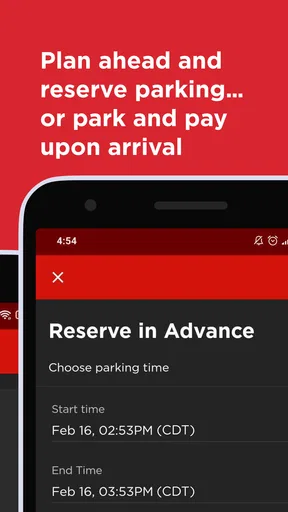
Premium Parking is a mobile parking app that helps drivers find, reserve, and pay for parking at participating garages, lots, and other locations. After creating an account, you can search for available parking by entering a destination or selecting a location on the map. Depending on the facility, the app may support advance reservations, digital payments, entry instructions, and mobile parking passes.
Can I reserve a parking space in advance with Premium Parking?
In many locations, Premium Parking allows users to reserve a space before arriving, which can be especially useful for events, busy downtown areas, airports, and popular destinations. Availability, reservation times, pricing, and cancellation rules vary by facility. Before confirming a booking, carefully review the selected location, arrival and departure times, access instructions, and any restrictions shown in the app.
How do payments and parking fees work in Premium Parking?
Premium Parking generally lets you pay through the app using an accepted payment method, such as a credit or debit card. The total cost may depend on the location, duration, event pricing, taxes, service fees, or other facility charges. Some locations may also offer pay-by-phone options or require payment at a kiosk. Always check the final amount before completing a transaction.
Can I cancel or change a Premium Parking reservation?
Cancellation and modification options depend on the specific parking location and the terms attached to your reservation. Some bookings may be canceled before a stated deadline, while others may be nonrefundable, particularly during special events or promotional periods. Open your reservation details in the app to review the applicable policy. Changes may require canceling the original booking and making a new one.
What should I do if I have trouble entering or leaving a parking facility?
If you experience problems at the entrance or exit, first check the reservation details and access instructions displayed in Premium Parking. Some facilities use a QR code, license-plate recognition, a confirmation number, or an intercom system. Make sure your vehicle information is correct and that you are at the reserved location. If the issue continues, use the app’s support options or contact the facility directly.


